
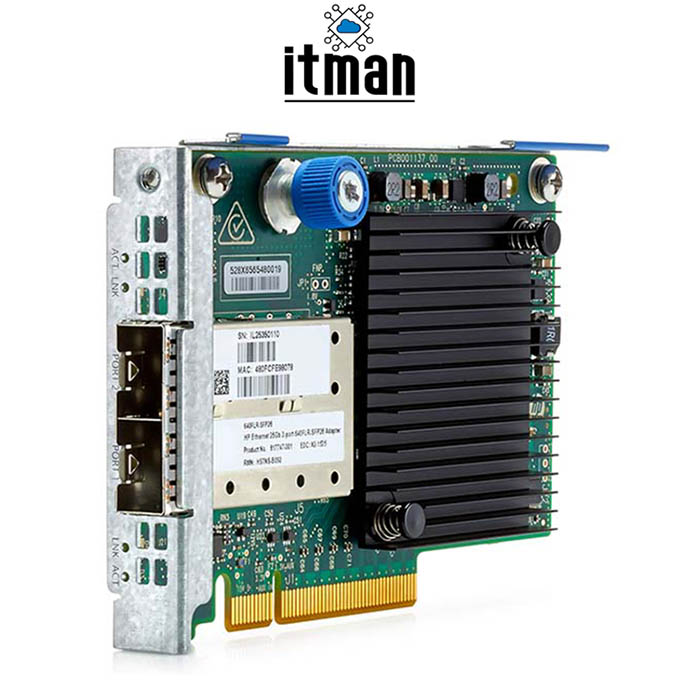
HPE 640FLR Ethernet Dual Port SFP28 10/25GB FlexibleLOM Adapter
$ 94.94
In the world of information technology and computer networks, the tools and equipment that are added to the organizational network of an organization play a very vital and fundamental role. One of these key equipment are network adapter that are responsible for communication between servers and other network devices. Here, we will introduce and review the HPE Ethernet 640FLR Server 2 Port Network adapter. Table of Contents ToggleHPE Ethernet 640FLR 10/25GB FlexibleLOM AdapterHPE Ethernet 640FLR FlexibleLOM Adapter FeaturesHPE Ethernet 640FLR SpecificationsHow to install HPE Ethernet 640FLR?Pre-installation Preparation:Installation Steps:Post-installation Steps:HPE 640FLR Dual Port SFP28 VS 560SFP 10Gb 2-PortHPE Ethernet 640FLR 10/25GB FlexibleLOM AdapterFor HPE ProLiant Gen10 Plus servers, the HPE Ethernet 640FLR Dual Port SFP28 10/25GB FlexibleLOM Adapter is intended to offer high-performance networking capabilities. With its two SFP28 ports, it can handle a range of network requirements by supporting 10GbE and 25GbE speeds. The adapter makes use of FlexibleLOM technology to facilitate future server design scalability and easy integration.VLAN tagging, RDMA, and NVMe over Fabrics (NVMe-oF) offloads are some of its sophisticated features, which maximize network efficiency and minimize CPU overhead. With its energy-efficient architecture and strong administration capabilities, the 640FLR adapter lowers operating costs and improves data center performance, making it the perfect choice for demanding enterprise environments. HPE Ethernet 640FLR FlexibleLOM Adapter FeaturesDual Port SFP28 Connectivity: Supports both 10GbE and 25GbE speeds with two SFP28 ports.FlexibleLOM Form Factor: Designed for HPE ProLiant Gen10 Plus servers, offering flexibility and scalability.Advanced Networking Features: Includes VLAN tagging, RDMA, and NVMe over Fabrics (NVMe-oF) offloads for enhanced network performance.Energy Efficiency: Optimized design to reduce power consumption without compromising performance.Management Capabilities: Provides robust management tools for monitoring and configuring network settings.Server Compatibility: Specifically engineered for seamless integration with HPE ProLiant Gen10 Plus servers.High Performance: Ideal for data-intensive applications and virtualized environments requiring reliable and high-speed networking solutions. HPE Ethernet 640FLR SpecificationsFeatureDescriptionInterfaceDual-port 10/25 Gigabit Ethernet (SFP28)Data Transfer Rate10 Gbps or 25 Gbps per port (depending on configuration)Form FactorFlexibleLOMNetwork StandardsIEEE 802.1Q VLANs, IEEE 802.3ad (LACP), IEEE 802.1p QoSAdvanced FeaturesVLAN tagging, RDMA, NVMe over Fabrics (NVMe-oF) offloadsManagementSNMP, Remote Management ControllerPower ConsumptionMaximum: Not specified by manufacturerDimensions (H x W x D)Not specified by manufacturerWeightNot specified by manufacturerCompatible ServersHPE ProLiant Gen10 Plus serversOperating Systems SupportWindows Server, Linux (Red Hat, SUSE), VMware ESXi How to install HPE Ethernet 640FLR?Use these general instructions to install the HPE Ethernet 640FLR Dual Port SFP28 10/25GB FlexibleLOM Adapter into your server. Please be aware that based on the model and configuration of your server, precise installation steps may differ slightly.Pre-installation Preparation:Shutdown the Server: Ensure the server is powered off before beginning installation to prevent any electrical hazards or damage.Review Server Compatibility: Confirm that the HPE Ethernet 640FLR Adapter is compatible with your server model and generation. Refer to the server’s documentation or HPE’s compatibility matrix for verification.Prepare the Workspace: Choose a clean, static-free work area with ample space to work comfortably with your server.Installation Steps:Open the Server Chassis:Remove the server cover or access panel. This typically involves unscrewing or releasing latch mechanisms on the chassis.Locate the Expansion Slot:Identify an available PCIe expansion slot that matches the adapter’s form factor (FlexibleLOM). The server’s user manual or documentation should indicate compatible slots.Insert the Adapter:Align the HPE Ethernet 640FLR Adapter with the PCIe slot and gently insert it into the slot until it is firmly seated.Secure the adapter by fastening the screw or latch on the chassis to hold it in place.Connect the Network Cables:Attach SFP28 transceivers to the adapter’s ports if not pre-installed.Connect the appropriate network cables (fiber optic or copper) to the SFP28 ports on the adapter. Ensure proper cable management to avoid strain or disconnection.Replace Server Cover:Close and secure the server cover or access panel back onto the chassis.Power On the Server:Turn on the server and allow the operating system to boot up.Install any necessary drivers or firmware updates for the adapter. You can download these from the HPE website or use the provided installation media.Verify Installation:Once the server has booted up, verify the adapter’s recognition in the operating system’s device manager or through server management tools.Configure network settings and verify connectivity to ensure the adapter is functioning correctly.Post-installation Steps:Driver Installation: If the operating system does not automatically detect the adapter, install the appropriate drivers from HPE’s website or the provided installation media.Firmware Updates: Check for and install any firmware updates for the adapter to ensure compatibility and optimal performance.Testing and Validation: Conduct thorough testing to ensure the adapter operates correctly under normal load conditions.By following these steps and referring to your server’s specific documentation, you can successfully install the HPE Ethernet 640FLR Dual Port SFP28 10/25GB FlexibleLOM Adapter and integrate it into your server environment.HPE 640FLR Dual Port SFP28 VS 560SFP 10Gb 2-PortFeatureHPE 640FLR Dual Port SFP28HPE 560SFP 10Gb 2-PortInterfaceDual-port 10/25 Gigabit Ethernet (SFP28)Dual-port 10 Gigabit Ethernet (SFP )Data Transfer RateUp to 25 Gbps per port10 Gbps per portForm FactorFlexibleLOMFlexibleLOMNetwork StandardsIEEE 802.1Q VLANs, IEEE 802.3ad (LACP), IEEE 802.1p QoSIEEE 802.1Q VLANs, IEEE 802.3ad (LACP), IEEE 802.1p QoSAdvanced FeaturesVLAN tagging, RDMA, NVMe over Fabrics (NVMe-oF) offloadsVLAN tagging, NPAR, RDMAManagementSNMP, Remote Management ControllerSNMP, Remote Management ControllerPower ConsumptionNot specified by manufacturerMaximum: 8.5 WattsCompatible ServersHPE ProLiant Gen10 Plus serversHPE ProLiant Gen8 and Gen9 serversOperating Systems SupportWindows Server, Linux (Red Hat, SUSE), VMware ESXiWindows Server, Linux (Red Hat, SUSE), VMware ESXi
Related products
-
Sale!

-
Sale!

-
Sale!