
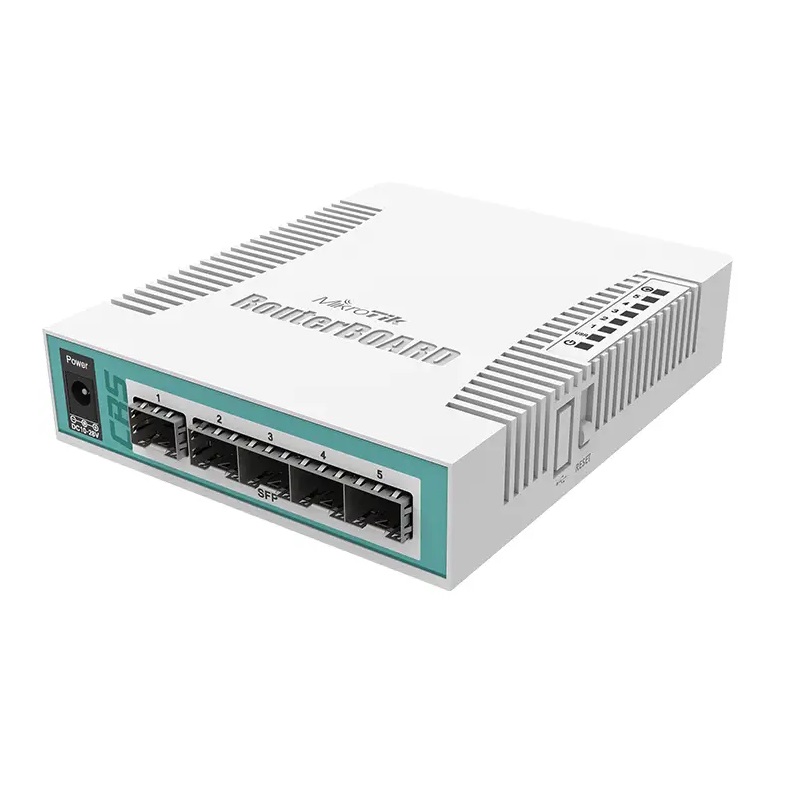
MikroTik CRS106-1C-5S Router Switch
$ 56.36
MikroTik CRS106-1C-5S Router Switch : Compact Powerhouse for Seamless Networking MikroTik CRS106-1C-5S Router Switch is a compact yet versatile network device designed to bridge the gap between high performance routing and advanced switching. Engineered for small offices, home labs, and fiber based access networks, this router switch combines the efficiency of SwOS with the flexibility of RouterOS Level 5, allowing users to tailor the device for either streamlined switching or complex routing tasks. What makes the MikroTik CRS106-1C-5S Router Switch stand out is its unique combo port design, which integrates a single RJ45 or SFP port alongside five dedicated SFP ports. This configuration provides exceptional connectivity options for both copper and fiber networks. Despite its diminutive size—measuring just 114 x 137 x 29 mm—this device packs the necessary power and reliability for professional network setups, with passive cooling ensuring silent, maintenance free operation. With a QCA8511 switch chip, 400 MHz CPU, 128 MB RAM, and 16 MB Flash storage, the CRS1061C5S delivers solid performance in a highly efficient package. The device operates across a wide temperature range of 20°C to 70°C, making it resilient in a variety of environments, from office desktops to wall mounted fiber distribution points. Key Features of the MikroTik CRS106-1C-5S Router Switch MikroTik CRS106-1C-5S Router Switch combines intelligent design with practical functionality: Five Dedicated SFP Ports: Enables highspeed fiber connections with minimal latency. One Combo Port (RJ45/SFP): Flexible integration for copper Ethernet or fiber connectivity. Switch Chip: QCA8511 provides reliable L2 switching performance. CPU & Memory: 400 MHz single core CPU and 128 MB RAM for stable, responsive operation. Storage: 16 MB Flash storage accommodates configurations and firmware updates. Dual Operating Systems: Switch between SwOS for simplified Layer 2 management or RouterOS for advanced routing and firewall functionality. Low Power Consumption: Operates at ~6 W, making it energy efficient and cost effective. Fan less Design: Passive cooling ensures silent operation without maintenance concerns. Compact Form Factor: Small footprint supports desktop or wall mounted installations. Wide Power Input Range: Micro USB or DC jack (11–30V) allows flexible deployment scenarios. Benefits of Using the MikroTik CRS106-1C-5S Router Switch Deploying the MikroTik CRS106-1C-5S Router Switch brings a host of advantages: 1. Versatile Connectivity: Combine copper and fiber networks seamlessly using the combo port and SFP interfaces. 2. Dual OS Flexibility: Choose between simplified switching or full routing and firewall capabilities. 3. Energy Efficiency: Consumes minimal power (~6 W), reducing operational costs for small network setups. 4. Silent Operation: Fan less design eliminates noise, making it suitable for office or home lab environments. 5. Compact Size: Saves space while maintaining professional grade networking performance. 6. High Reliability: Operates in extreme temperatures and challenging conditions without performance degradation. 7. Future Proof Deployment: Supports modern fiber access networks, making it ideal for both current and upcoming infrastructure. Practical Use Cases MikroTik CRS106-1C-5S Router Switch excels in a variety of scenarios: Small Office Networks: Provides stable fiber or copper connections for essential office equipment. Home Labs & Test Environments: Ideal for networking enthusiasts or developers needing a compact, flexible device. Fiber Access Points: Acts as a mini aggregation switch for connecting multiple fiber clients. Branch Office Connectivity: Supports efficient LAN expansion for remote or satellite offices. Cost Conscious Deployments: Offers reliable gigabit switching without the cost of full sized enterprise switches. How to Maximize Your MikroTik CRS106-1C-5S Router Switch 1. Choose the Right OS Mode (SwOS vs RouterOS) SwOS is ideal for simple, highspeed Layer 2 switching tasks, while RouterOS Level 5 unlocks routing, firewall, and advanced network management features. Select the OS based on network complexity. 2. Leverage VLANs for Secure Network Segmentation Use VLANs to separate traffic, enhance security, and organize your network efficiently, even in small deployments. 3. Utilize the Combo Port Strategically Decide between copper or fiber connectivity to extend network flexibility and optimize port usage. 4. Monitor Traffic and Performance Regularly check port statistics and CPU load to prevent bottlenecks and maintain consistent network performance. 5. Reduce Power Consumption with Smart Planning Deploy switches where necessary and avoid overloading ports, ensuring energy efficient operation. 6. Deploy It as a Fiber Access Aggregator Aggregate multiple fiber clients into a single upstream connection, reducing complexity and cabling needs. 7. Backup and Restore Configurations Take advantage of Router OS backup functionality to safeguard configurations and minimize downtime during maintenance or updates. Comparison with Similar MikroTik Products Feature / Model CRS106-1C-5S CRS112-8G-4S-IN CRS125-24G-1S-RM SFP Ports 5 4 1 Combo Port 1 RJ45/SFP 1 RJ45/SFP 1 RJ45/SFP CPU 400 MHz single-core 720 MHz dual-core 1 GHz quad-core RAM 128 MB 256 MB 512 MB OS SwOS / RouterOS L5 SwOS / RouterOS L5 RouterOS L5 Max Power Consumption ~6 W ~15 W ~35 W Form Factor Desktop / Wall mount Desktop / Rack Rack Cooling Passive Passive Active The CRS1061C5S is ideal for compact, low power deployments, whereas the CRS112 and CRS125 target larger, higher through put networks. Technical Specifications Feature Specification Product Name MikroTik CRS106-1C-5S Switch Model Number CRS106-1C-5S Switch Chip QCA8511 CPU 400 MHz single-core RAM 128 MB Storage 16 MB Flash Ports 5x SFP, 1x combo (RJ45/SFP) Power Input microUSB or DC jack (11-30V) Max Power Consumption ~6 W Operating System SwOS / RouterOS Level 5 Cooling Passive (fanless) Dimensions 114 x 137 x 29 mm Operating Temperature -20°C to 70°C Mounting Options Desktop / Wall mount Frequently Asked Questions (FAQ) Q: Can the CRS1061C5S operate silently in a home or office? A: Yes, the fan less passive cooling design ensures quiet operation. Q: Does it support both SwOS and RouterOS? A: Yes, you can choose SwOS for simple switching or RouterOS Level 5 for advanced routing. Q: What is the maximum power consumption? A: Approximately 6 W, making it energy efficient for small deployments. Q: Can the combo port be used as either RJ45 or SFP? A: Absolutely, providing flexible deployment options for copper or fiber networks. Q: Is it suitable for fiber access aggregation? A: Yes, the product efficiently aggregates multiple fiber connections in compact setups. About MRHPE MRHPE is a trusted provider of MikroTik products, including the MikroTik CRS106-1C-5S Router Switch. Known for reliability and quality, MRHPE ensures access to genuine products along with professional support for network deployment and management. Organizations rely on MRHPE for high performance networking solutions tailored to both enterprise and small office environments.
Related products
-
Sale!
-
Sale!

-
Sale!